What is a workspace?
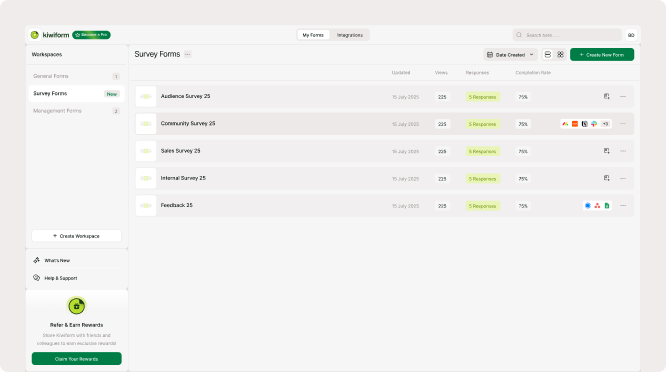
A workspace is where your forms live. It gives you a single place to create, edit, and manage forms, view responses, and keep your projects organized. Instead of working with scattered forms, a workspace helps you keep everything grouped together so you can move between forms and responses without confusion.
When you create forms in Kiwiform, they are saved inside your workspace. This makes it easier to return to them later, duplicate them, update them, or track their responses over time. Whether you’re building forms for personal projects, business use, research, or feedback collection, a workspace keeps everything structured and easy to access.
How workspaces help you stay organized
As you create more forms, keeping them organized becomes important. A workspace lets you manage all your forms from one dashboard so you can quickly see what’s active, what needs updates, and where responses are coming from.
You can open any form from your workspace to edit it, view its responses, or adjust settings. This makes it easier to handle multiple forms without losing track of them. Even if you’re only working on one form right now, using a workspace keeps everything ready for when your projects grow.
Everything you need is accessible without extra layers or complicated setup, making it easy to move from creating forms to managing responses in one continuous workflow.
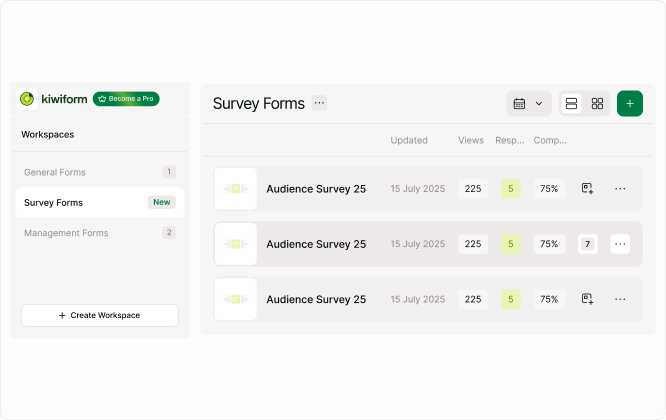
Kiwiform keeps workspaces simple by focusing on clarity and usability.
Creating forms inside a workspace
When you start building a new form, it is automatically created inside your workspace. From there, you can edit the form, preview it, share it, and track responses. This helps you keep all related work together and makes it easier to revisit forms later.
If you use templates, the new form created from a template will also be saved in your workspace. This ensures that everything you create stays organized and easy to find.
You can create one form or many forms and manage them from the same place without needing to switch between different areas.
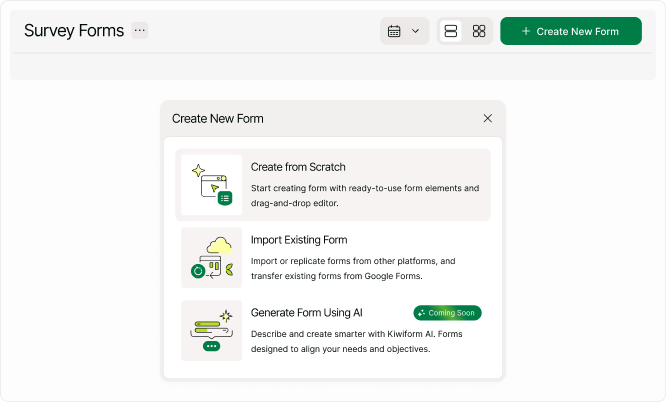
Workspaces are designed to support both simple and growing workflows.
Managing forms and responses
Your workspace gives you a clear overview of each form and its activity.
From here, you can:
1. Open forms to edit or update them
2. View and analyze responses
3. Duplicate forms for new use cases
4. Share forms through links or embeds
5. Track which forms are active
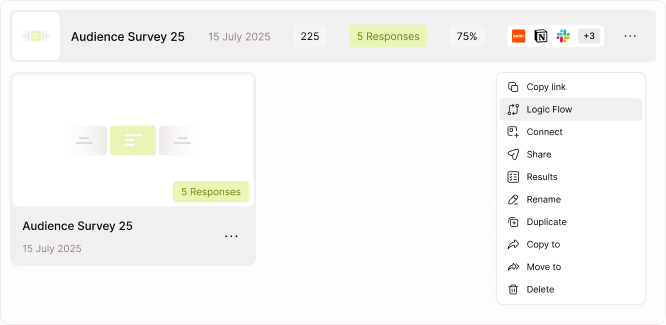
This overview helps you understand what’s happening across your forms without needing to open each one individually. It keeps everything visible and easy to manage.
Because Kiwiform is a free Typeform alternative focused on simplicity, the workspace experience is designed to be straightforward and reliable. You can focus on building forms and collecting responses without worrying about complicated account structures or setup.
When to use a workspace
You’ll use your workspace every time you log in. It’s the starting point for creating new forms, checking responses, and managing existing forms. Whether you’re collecting leads, running surveys, or gathering feedback, your workspace is where all activity begins and stays organized.
As your form usage grows, the workspace continues to keep everything clear and manageable. You can move between forms, track progress, and update workflows without losing visibility.
Summary
Workspaces give you a central place to manage all forms and responses. They help keep your work organized, make it easy to switch between forms, and provide a clear overview of what’s happening across your projects. By keeping everything in one place, Kiwiform ensures you can build, share, and manage forms with confidence.